
How I Run My Daily Planner
For 8 years, I've been running a planner document in Notion. I started when things got too overwhelming to keep in my head. Eventually, I refined a system that helps me not drop the ball on small things and actually ship big, complex projects.
Here's a hyperlist of what I did in 2025:
Got married in Georgia, got a parrot, built a project for a startup visa and moved to Portugal, found and worked a job, ran the Belgrade half marathon, took comics and podcasting courses, got a piercing and several tattoos, organised trips to Bosnia, Kazakhstan, Kyrgyzstan, Montenegro, Armenia, Croatia, Slovenia, Italy, France, and Spain, bought a car in Germany, didn't forget friends' and relatives' birthdays, regularly studied English, worked out and read, went to rallies, lectures, exhibitions and concerts, hung out with friends and did a bunch of other small stuff — a total of 2,457 tasks.
The list of the things I haven't done this year is longer (including publishing more articles, huh). But if I didn't manage things the way I do, I would've achieved way less.
I want to share how and why this works for me — maybe you need it too. Also, I'll analyse what works, what doesn't, and what I'll try this year.
What I'll cover:
- How I use the system
- How to write things down — the rules that make the system work
- Additions to these rules
- What to write down — where tasks come from
- Where to write things down
- What I tried but didn't work — and why
- How I want to improve the system
- Why people usually dislike such systems
I'll also share my template — and materials to dive deeper into the topic: design your own system or better understand how and why certain principles and techniques work.
What it looks like
Every day I wake up, brush my teeth, make coffee, open my laptop and see this:
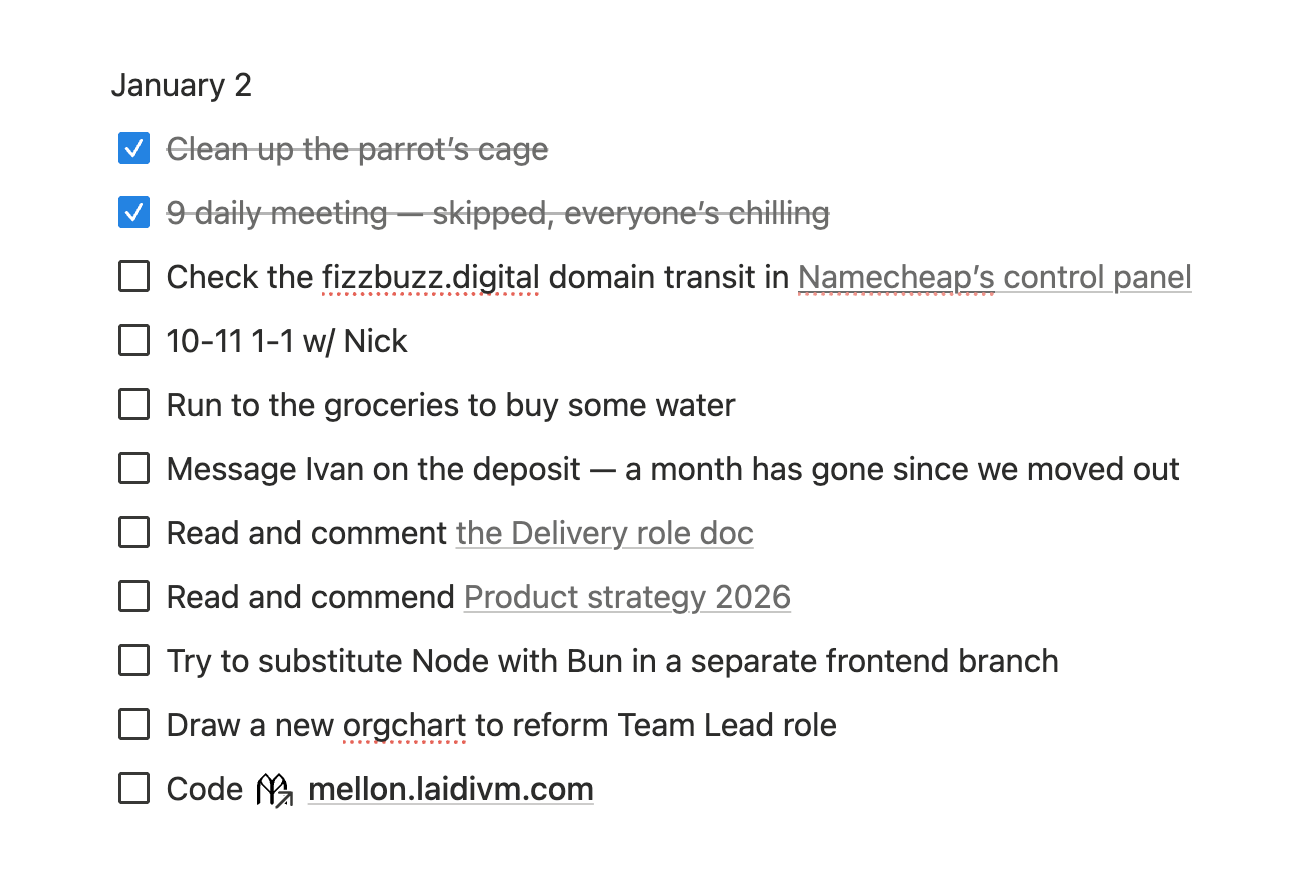
I start doing things from top to bottom. Things with a time — at that time. Everything else — in the remaining time. In between — I try to rest, eat, and hug my wife. What I've done — I check off. What I haven't — I reschedule to other days or to the buffer. Before sleep, I prep tasks for tomorrow and go to bed. And so on — every day.
Sounds very simple — that's the beauty and the key to success. Now about the principles behind this simplicity.
How I write things down
Write everything down. Every call, every meeting, every task. I have a simple rule that my close ones and friends know:
unwritten means fucked up
It's reasonable to ask: “wait, write down literally everything?”. It depends on what you want to achieve and how heavy the life period is. Unexpectedly, the heavier it is — the more you should write down. At one point, I was writing down any task longer than 5 minutes. That's how I found time-wasters and was very mindful about tasks. Every time you write before doing something, you think: do I really need to do this. Every time you write after doing something, you think: was it worth it.
It's hard to sustain that tightly wound system for long — but you don't need to. I lived like that for a month, analysed the log, and switched to a more relaxed system — after concluding how to change my life and work processes.
Tracking helps understand why something isn't working. Not just “I was busy” — but with what exactly. And then understand: was it worth it, and if not — how to get rid of it in favour of what was worth doing.
You can skip writing down tasks you're not going to do. You can immediately say: “no, I won't do this”. Or write it down, decline after that — and cross it out. You don't have to be immediate. But having records of what you didn't do, aren't going to do, or can't manage — makes it easier to manage expectations, including your own. You can warn in advance “I won't be able to do X” — at all or by the deadline, and come up with Plan B.
With no exceptions. Weekends and holidays are also in the
In one place. Calls, meetings, documents — everything stays in one document where nothing gets lost. Yes, I have calendars, Jira, and saved messages in Telegram — but everything I do ends up in one place, because I'm also just one person.
My time is linear, I can only focus well on one thing at a moment. So I manage my tasks accordingly. This lets me switch contexts less; not remember what, where and when; instead of organisational bullshit caused by the system itself — just do things. Or think about how to do things better.
Split into iterations. The obvious point of a daily planner, but I'll say it anyway. I divide into blocks: days, weeks, months, and years. At the end of each — a small ritual: plan the next day, call close ones. I know that sometimes people split days into time blocks, or group weeks and months. I don't have that need, but it might be useful for someone.
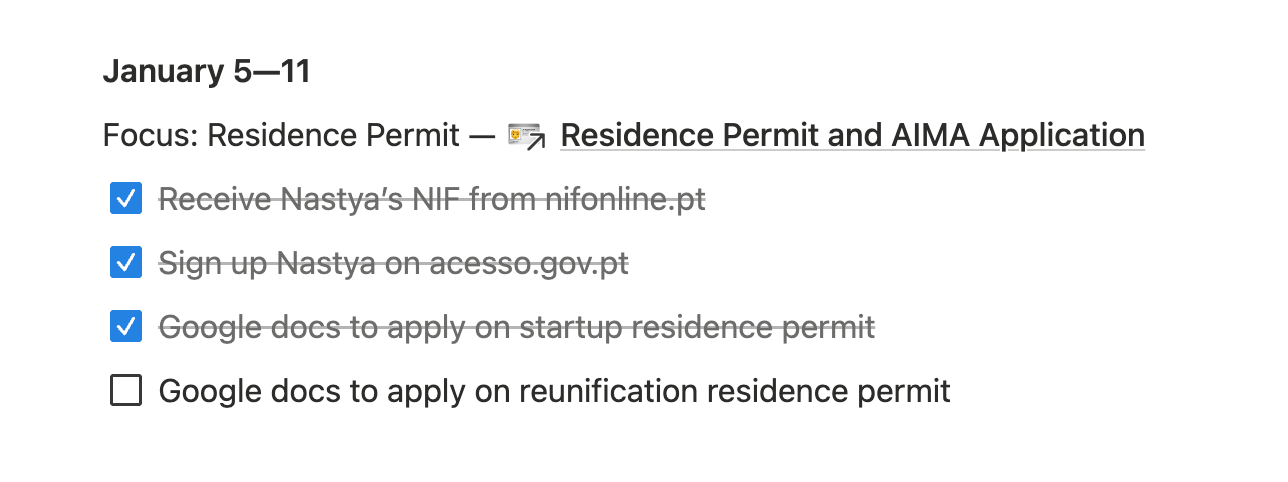
Focus. There are always more tasks than possibilities. The world is noisy and chaotic. Sometimes you just want to fuck around. That's why I write down the main task of the week, less often of the day or month, so that every time I open the list — my eyes catch what's really important, and I can return to it. Or when there are many tasks — I can reschedule some without guilt if they're not related to the focus.
There should be only one focus at a time. If something else claims the focus spot, choose one and move everything else to the next week. If I already closed the focus mid-week, okay, only then I can add a second one:
Decompose. All tasks in the list are those I can do in one turn. If I can't — I split them into subtasks. If I don't understand how — I split them into subtasks. If I got interrupted — I write down what I did and what's left to do (well, yeah, I split them into subtasks).
Instead of “Submit startup visa application” I had:
- Day 1: Attach your docs, write motivational letter
- Day 2: Sign and attach motivational letter. Push Eugene to send me the documents
- Day 3: Innovative nature of the project (required field)
- Day 4: Justification of the internationalisation business potential
- Day 5: Financial model
- Day 6: Job creation potential
- Day 7: Estimated turnover in 5th year
- Day 8: Attach Eugene's documents
- …
Decomposition helps avoid being stunned by the scale of the task, because it lets you build a path to the goal. Even if something doesn't go according to plan — you update the plan with new inputs. So there's always a picture in front of you of how to get the result — and specific points to align your actions with.
Besides, decomposition lets you see progress and more easily restore context when switching. If you feel it's going tough, it's worth pushing harder or thinking about what's going wrong. If there's already significant progress but you feel tired — rest, do something else without guilt, or celebrate and praise yourself for successes.
Sort. First, write down tasks that are fixed to time: for example, from 11 to 12 and from 14 to 15:30. Then write down tasks that aren't fixed to time but need to be done somehow relative to fixed ones: for example, put morning run before 11, and booking a bar — after 15:30, because it only opens at 3. After that, leave some space and write down other tasks: from more important — to less. Stop when you feel overwhelmed and move a couple of last tasks for tomorrow.
The less thinking later — the better. Usually it's abstraction that makes you think. That's why I don't write “work on the project”, but specifically: “Push startup visa application: attach docs from downloads to IAPMEI website”.
The more specific the task, the higher the chance of completion. Claude, that analysed my planner, points out that when I still write abstractly, like “prepare for an interview” or “deal with documents” — I complete tasks only in 60% of cases. But specific tasks are completed in 95% of cases. That's why I prefer wordings like “work on the next Mellon update — go on with handleUnlock”.
Sometimes it's complex structure that makes you think. So I make linear lists — one per day. Tasks can be grouped with one level of nesting if they're united by common context. For example, instead of “prepare for an interview” I got something like this:
August 4
14-15 :30 interview with Mojam team leads- Test the product on the website
- Look at notes from previous calls, copy team structure
- Write a couple paragraphs why you want to join Mojam — adapt Emma's pitch
Preparation took 40 minutes and I pleasantly impressed the folks — instead of remembering in a rush before the call what I needed to say.
Constantly return to the planner. You don't need reminders if you have everything clearly written in one place and you constantly look at it. The planner is the place you check before scrolling memes on social media. At least, it helps you understand whether you can afford to do that now, or not. If you write things down but don't read them on time — it won't work.
Trust the system. No system guarantees that nothing will be forgotten or that everything will be done. Especially at the start, when the habit isn't as settled, not all rules work at full capacity, not all skills are automated. This is okay — and over time, when you get used to the system and fine-tune it, it will work even better. Backup systems and double-checks aren't needed if the main one works properly.
There's another reason why people stop trusting the system: “well, I'm in a crunch now, no time to spend on writing things down, I'll just grind — and we'll figure it out later”. Sometimes it really is like that. But usually — sticking to writing todo's actually helps both catch the crunch state and get out of it. And in the crunch itself — choose from all records those that seem most valuable to complete.
Reschedule or mark undone. Sometimes in my planner such records slip through:
- Go to the gym — got sick(
- Go for a run — fuck it
19-22 visit the film club at Woop Woop School — didn't sleep at night, skip
This is fine — I have no obligation to anyone, including myself, that I'll do everything from the day's plans. Unfinished tasks can be rescheduled or marked undone and copied. It depends on whether the lists are open or closed.
Open lists are those that can constantly change. For example, there can be 20 tasks for a day. If you did 10 most important ones, you reschedule the next 10 forward if they're still relevant — or delete if not. The downside — hard to track how plans for the day changed and whether there are tasks that are systematically being postponed or dropped.
Closed lists are those under which you draw a line and the only change is closing items. If you didn't do something — you leave it undone. If it's still relevant — you copy it to the next closed list. The downside — reality is more complex, and you usually need to adapt to it rearranging the daily tasks on the go. Or leave empty slots for unplanned or hard-to-plan tasks.
I don't strictly follow either option: some tasks I mark undone, especially if they're no longer relevant. I.e. if it's a one-time event — and there won't be another. Or when it's a regular event and there will be another entry soon anyway, without rescheduling. Other tasks I just drag from the end of the list to the beginning. Sometimes I have a strict plan for the day I hope to complete entirely. Sometimes — a plan with a buffer, where it's important to do enough, but not necessarily everything.
It might seem chaotic, but I explain this with the last rule.
Don't overthink shit. The system shouldn't be a pain in the ass — you don't have to rely on willpower to follow it. It should forgive small mistakes. And you should forgive your own mistakes too.
Sometimes I forget to write something down. Or I temporarily write tasks in saved messages — instead of immediately writing them in Notion. Or I mark some messages or emails as unread again instead of writing down a todo “read X”. Yes, in those moments I lose to my own laziness. I've learned not to blame myself for this, because the system still works well.
What else matters
Project documents. I lied a bit: there's a second place with lists of decomposed tasks. The planner is a log broken down by days. But I can't plan all tasks by days in advance, and dragging huge lists of project tasks from one week to another is exhausting. So each project: an activity that's more than a week's worth — has its own document with its own task backlog.
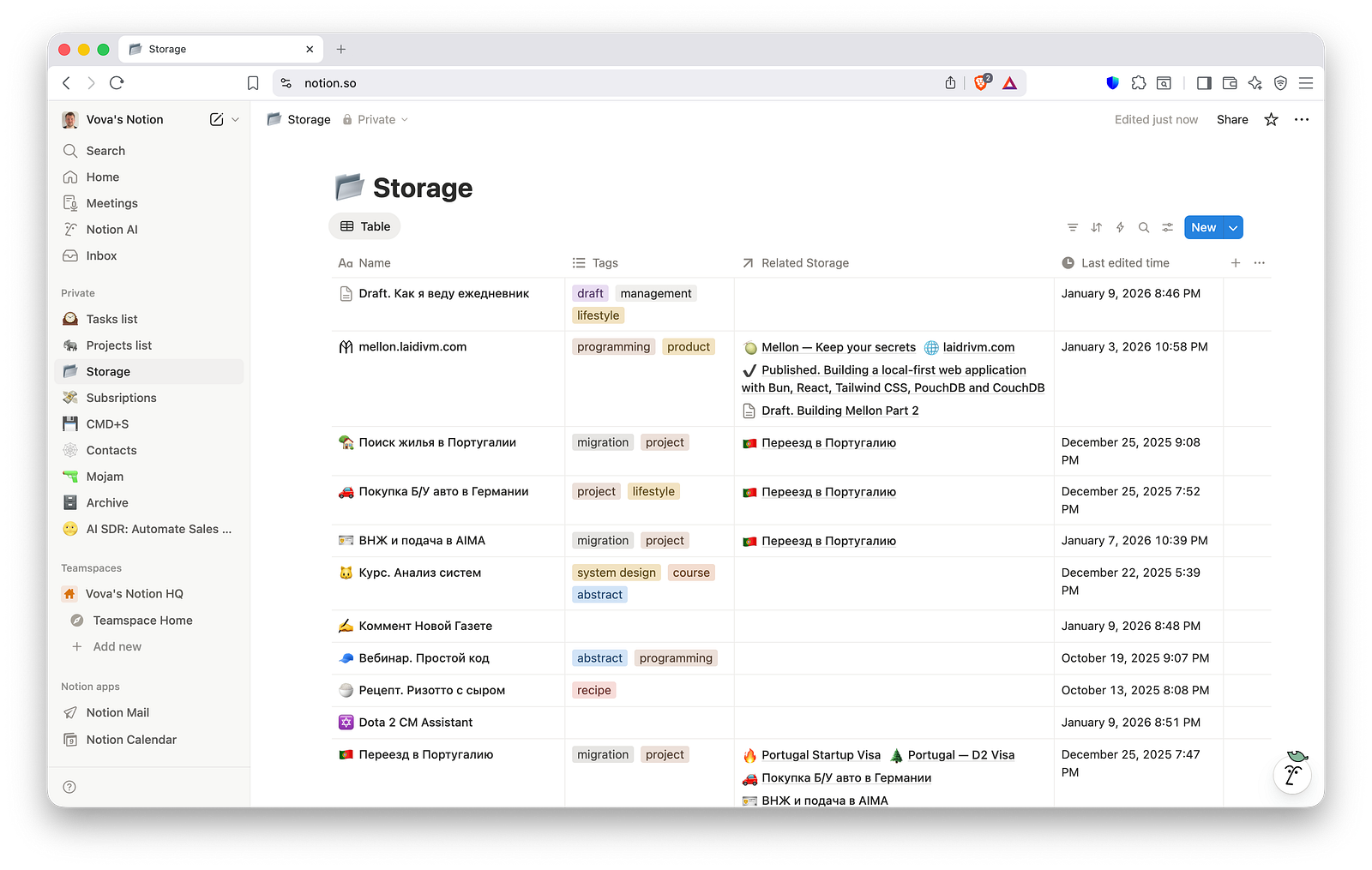
In the planner I might write something like “work on project X (link)”. This means the project has its own detailed task list — and I just need a little nudge to switch and start doing them. Yes, this approach breaks the “in one place” and “the less thinking later the better” rules — but for a reason.
Usually projects have many days of work. Sometimes you want to dedicate at least 5 minutes a day to a project to feel progress. Often a project has its own specific context you switch into. So I keep most project tasks in project documents. Those that need to be done at a specific time — I move to the planner in advance. Sometimes I move project tasks I did that day to the planner — to praise myself later.
Routine. Every day, week, month or year (or any other interval) there can be a repeating task. For example, every Sunday I call my parents and grandma, water the plants, and go for groceries (the stores are open, it ain't Germany). Every month I write down birthdays, update the /now page if there is news, pay bills and trim my toenails. I completed such task blocks entirely in 90% of cases — in the rest I was usually traveling, so I did them partially. Such repeating tasks didn't cause resistance or desire to postpone.
New habits. Often people make separate checklists, tables, or even keep apps for habits. I tried that too — didn't work for me. If a habit is automated, like brushing teeth — there's no point tracking it daily, that's an overkill. If I want a new habit, I can't develop more than one at a time. So I just write down the new habit as one of the day's tasks — and mark its completion until I start doing it without looking.
Besides, a habit checklist seems like an unjustified deviation from the “in one place” rule.
Load control. The planner lets you control load and notice some patterns. Truth is, I have one pretty simple pattern: usually, if I busted my ass beyond measure one day — the next day isn't very productive.
Everyone decomposes their own way, and everyone's measure is their own. Worth experimentally finding that number after which doing anything becomes hard or starts affecting other days. When tasks become more than this number — worth starting to reschedule things forward.
The number itself can vary with tasks too. If there are shitty tasks or lots of context switching — you'll manage less. I have days with five meetings. Between meetings I'll at best manage two-three small tasks — and then collapse into my chair. No way to do any thoughtful work that day — at most I can manage sports after.
So it might be a good idea to organise meeting-free days for yourself, and for these days to be not only on weekends. It can also help to reserve blocks of several hours in the calendar to focus.
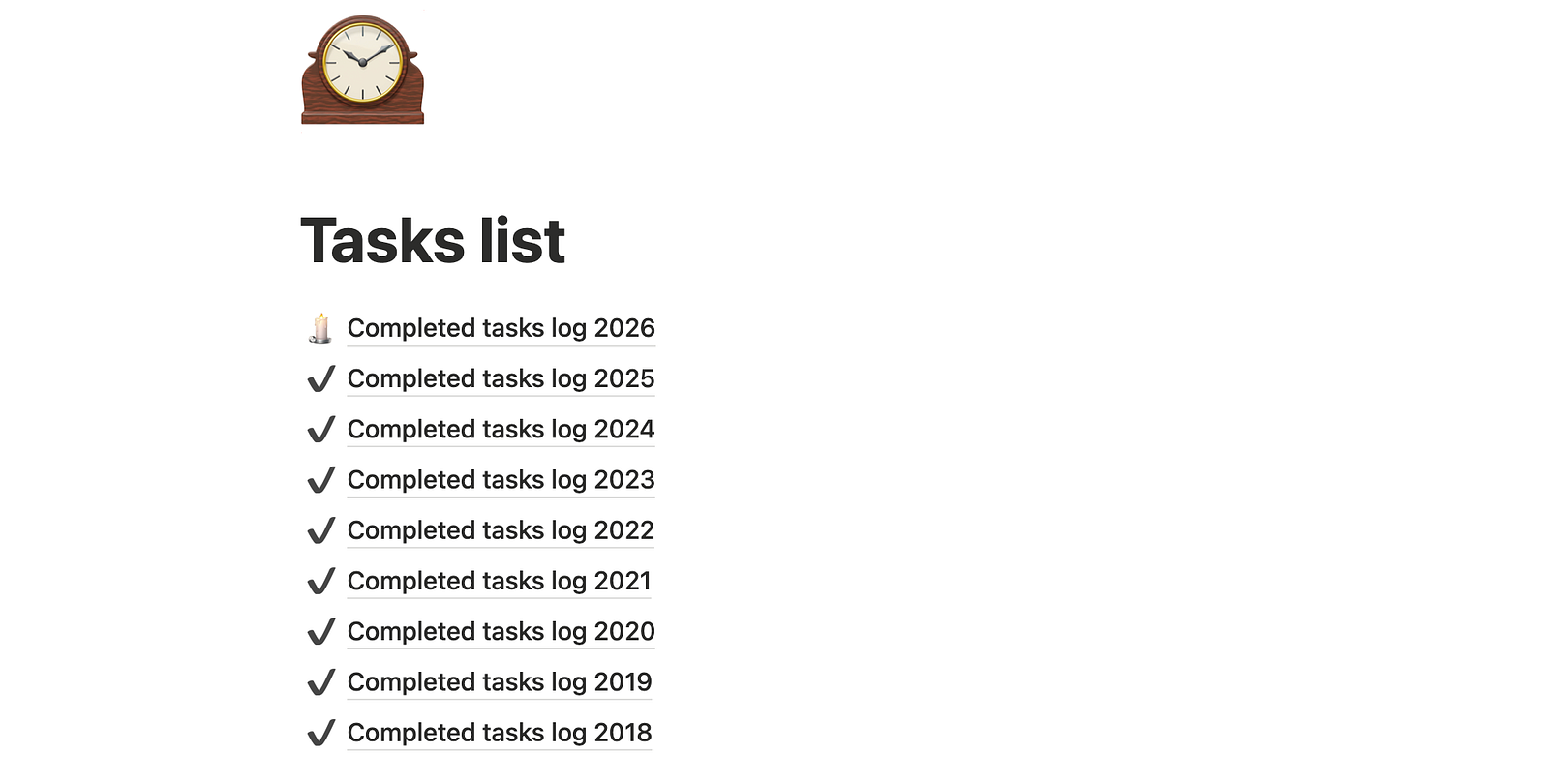
Year log dump. Every week I move completed tasks to a separate document, something like Completed Tasks 2025. Archieved tasks don't distract. Besides, this helps me in three cases:
- Once a month I check whom I congratulated on what a year ago in the upcoming month.
- Once a year I reread what I was doing last year, reflect and try to draw conclusions. Now you can feed it to LLMs and ask them to analyse — did that this time.
- Situationally I look at what I've been doing recently and some task details that are relevant again — for example, some links, IDs or something else.
Buffers in toggles. Sometimes I get swamped: too many work tasks piled up, or algorithms shoved too much interesting stuff at me, or got sick and fell out of rhythm. Usually this means dozens of tasks accumulate in the doc, migrating from day to day or even week to week. The main thing in such a situation:
- Tell everyone you're swamped.
- Reduce commitments.
- Start doing more tasks than are coming in.
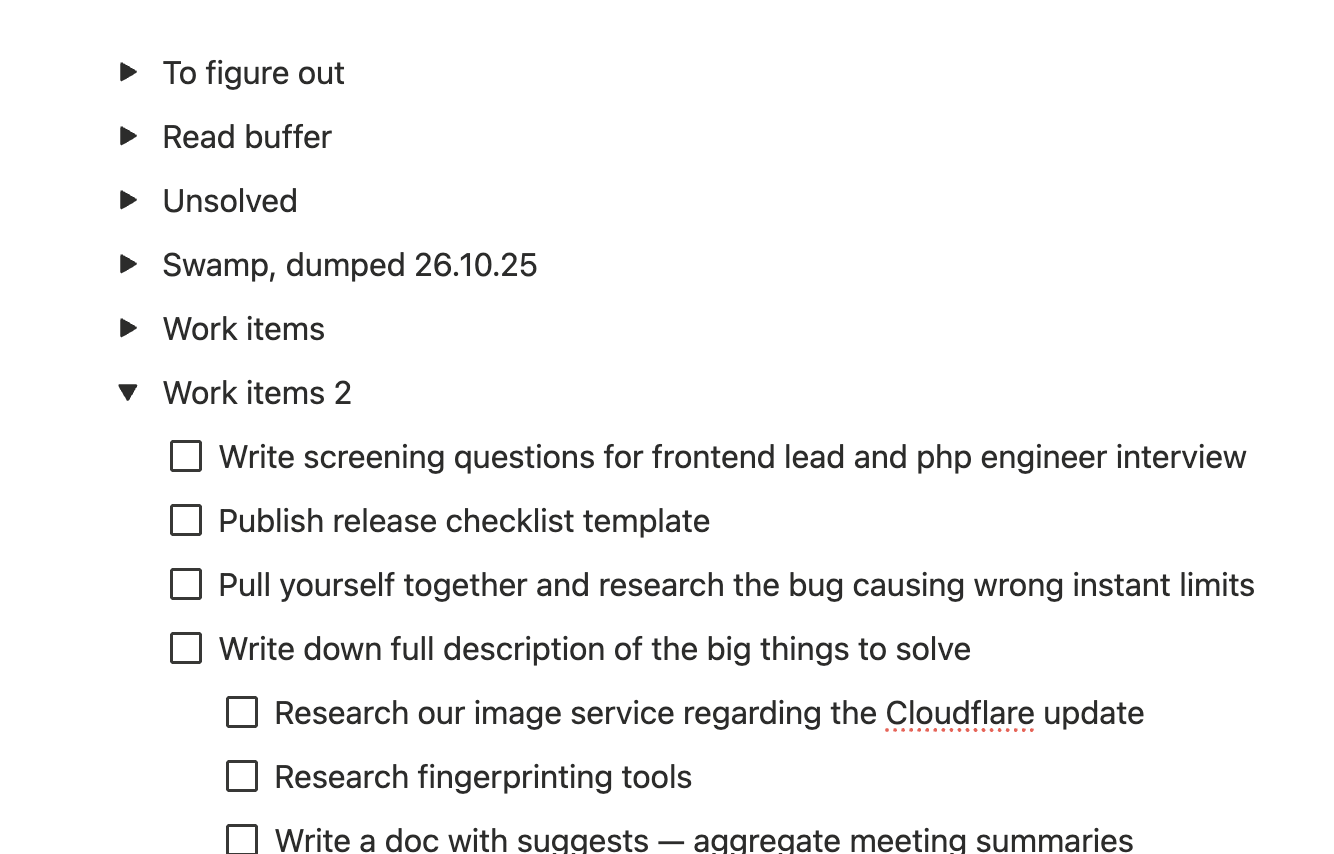
Then I hide all migrating tasks under a toggle — and deal with them in time left over from the reduced task flow. If something important or urgent ended up under the fold — they'll usually remind me. If not — ¯\_(ツ)_/¯.
Task filtering. Writing down tasks helps escape reactive mode — when you grab whatever hit you last. If you write it down and continue doing what you were doing, and come back later — it often turns out you don't need to do it at all. It's good when there's a chance to let tasks sit for a day. That way you manage better to only do what's truly important.
Where the tasks come from
Calendars. I don't use them conventional way. I write out in the planner all the events from several calendars. Manually, because at that moment I think:
- Is this time convenient for me?
- Is this easy to reschedule or better to adapt?
- Is this thing worth that much time?
- How do I need to prepare and will I make it?
Implicit buffers: Telegram saved messages, browser tabs. Sometimes tasks are stored in places not meant for them — but convenient enough to use without thinking.
Imagine 40 browser tabs: some with work tasks, others with reading materials, some with messages or emails to reply to, and here's something kinda useful but need to figure it out, oh and here you can pick up a gift. In theory it's fine: did the task — closed the tab. In practice you start constantly shuffling through them, and then a second browser window appears with its own tabs…
To avoid this, I keep a basic minimum of tabs: password manager, Claude, Perplexity, email, Notion page with tasks. At the end of the day I close all the other tabs optionally converting them into tasks: what exactly needs to be done with this link — and group them.
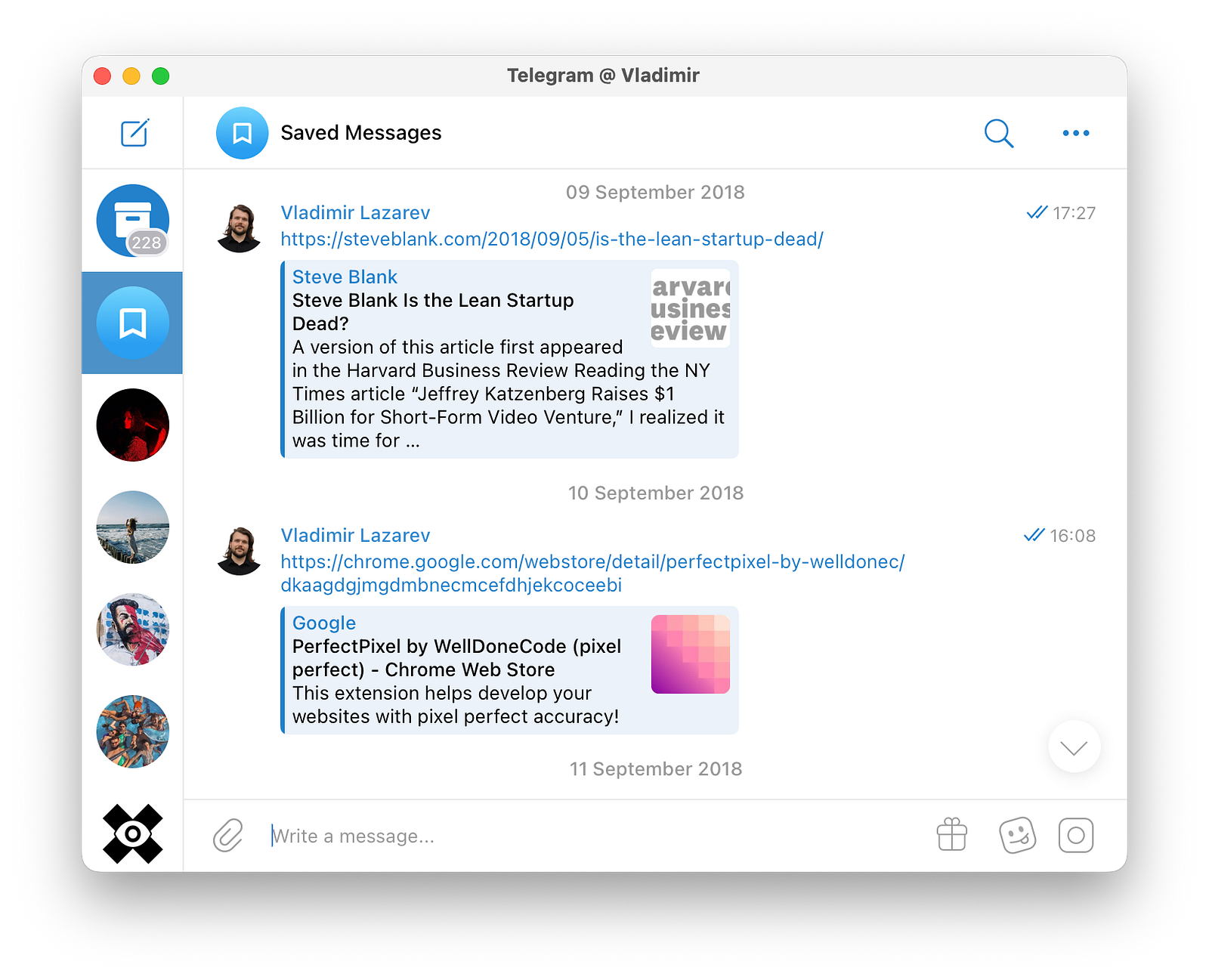
Same with Telegram saved messages. You can quickly and conveniently write down anything there: a task, reminder, links, notes, ideas — and also throw in a screenshot, file or forward a post. Occasionally they become completely unmanageable. I still can't fully break myself of this habit, so once every couple weeks on a weekend I dig through all saved messages from the previous time.
Messages: email, chats, SMS. If responding takes more than 10 minutes or to respond “I need to think” — I write it down as a separate task. I combine this approach with the inbox zero method. Because keeping messages unread or unprocessed is also an implicit buffer.
Conversations: physical and virtual. Both in formal meetings and informal conversations with close ones, people say things that look like tasks: hell, even a simple request to go to the store for milk. So you need to be ready to write it down on the go, or right after — so you don't forget, plan and do it.
Feeds: social media, RSS. Social media feeds throw things at you that can become tasks. For example, YouTube algorithms. You go to the homepage with dopamine withdrawal, and look — dozens of videos, and you want to watch each one. And if you choose one — you're afraid to miss the rest, what if they disappear from recommendations. In such moments I choose one video, and write out the rest in a watch list. I often don't even get to the watch list later — but I get rid of anxiety and don't spend too much time on pseudo-education.
Controlled feeds are much better. I once tried collecting custom RSS subscriptions in feedly. Dropped it because the information flow was already huge. Besides, most projects I'm interested in following usually offer email subscriptions — where they send not every piece of content, but grouped digests. In any case, materials from such feeds are worth adding to tasks: so you don't get caught doomscrolling, read the most useful stuff and don't struggle later searching for links in history.
Project documents. I already mentioned them. There I decompose work that takes more than a week and requires any supporting notes. After which — I copy or move a batch of tasks to the planner and spread them across days.
Where to write it down
This is a frequent but relatively unimportant question. Anything works if it has:
- Backup possibility
- Easy and quick access to records
- Easy way to mark progress, add notes and change order of records
For me it's Notion:
- These are text documents
- That sync through the cloud between devices
- With a good mobile version
- Where you can easily add a todo block, check it off and drag it around
Popular options I ruled out — but maybe they'll work for someone:
- Physical planner: easy to lose, plus you have to constantly rewrite tasks or mark numbers — what comes after what
- Txt file: locks you to one device
- Apple Notes: locks you in one ecosystem
- Google Docs and Sheets: even from a computer filling them in this format is torture, let alone from a phone
- Telegram saved messages: long messages aren't that easy to edit from phone. Plus, one clumsy swipe and saved messages get deleted entirely from everywhere
- Trello: because boards are overkill. Plus, the service itself noticeably got more complicated after Atlassian bought them
I've heard some people keep daily planners in Evernote and Todoist — but haven't tried them myself.
What didn't work for me
Categorisation. Any labels: tasks, subtasks or supertasks; work or personal life; health, self-development, projects, bureaucracy or anything else — doesn't help at all. The only thing this might help with: statistics, and if you want to heavily balance life by categories.
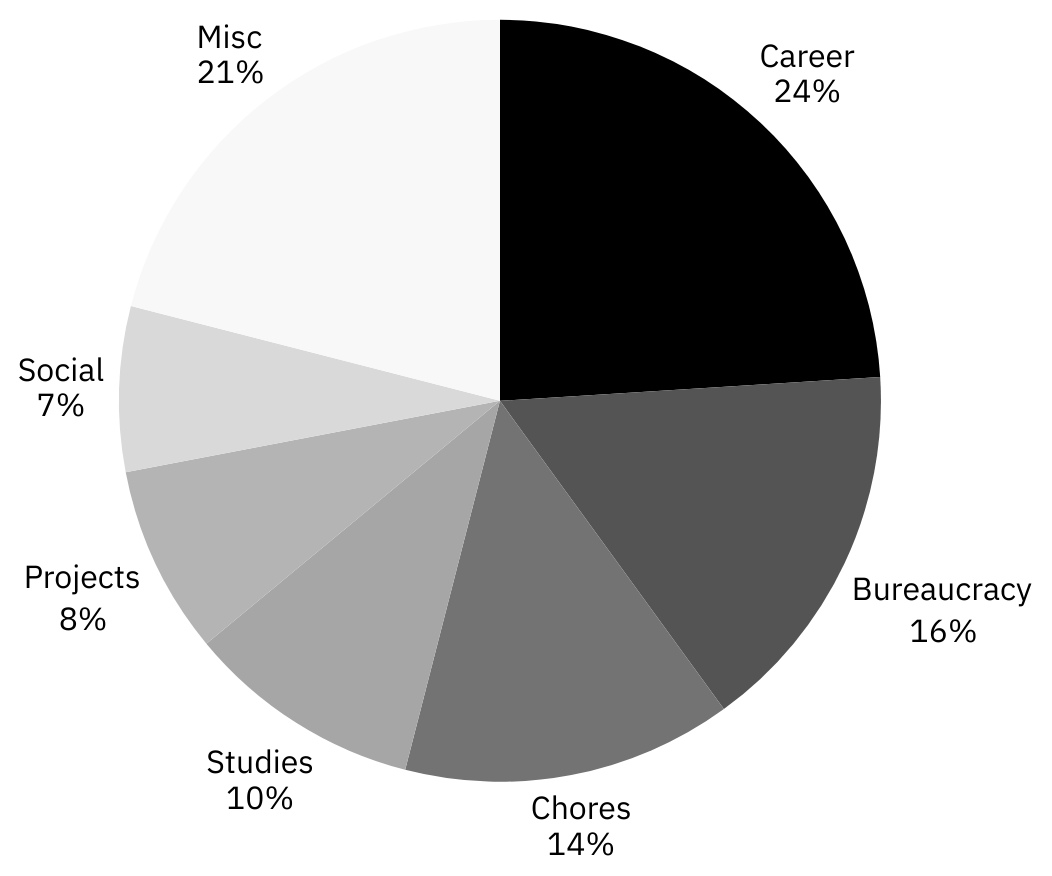
LLMs help with statistics. I fed Claude with an export of tasks for 2025, it calculated everything for me. Here's my top categories, if you're curious:
- Work and career, 24%: interviews, 1-on-1s and other meetings, code reviews, writing docs and other artefacts. According to Claude's estimate, after I got a full-time job, the number of tasks in this category doubled
- Bureaucracy and documents, 16%: visas, parrot docs, consulates, correspondence, taxes, banks, residence permits, translations, legal entity. Hello to all migrants, welcome to adult life or this is how you slide into anarchism
- Regular rituals aka routine, 14%: clean up after parrot, call family, water plants, go grocery shopping, do English or sports
- Self-development and learning, 10%: English; comics, podcasting, React and DevSecOps courses; reading articles and watching smart videos
- Projects, 8%: Mellon, laidrivm.com, Telegram channel
- Social, 7%: meetings and calls with friends, birthdays
Life balance is harder. So much so that restructuring it is a task that doesn't get solved in a planner. Usually you do what you ought to. Wrtiting it down will just help you do it better. Writing anything else won't help not to do what you should. Don't fool yourself — better look for other ways besides the planner.
Boards. Boards are good for syncing people — but I learned to manage them with task lists too. I just set a reminder task in advance. If I need to remind again — I set it again.
Also multiple columns help when cards in them don't get done in one turn — and stop in intermediate statuses. But I prefer to start tasks one by one — and finish them as quickly as possible. Turns out in most cases two columns work for me: todo and done. Or empty and filled checkbox in text lists, what a coinsidence.
Long focuses. Day and week — are fine horizons. You might forget longer focuses, because it appears before your eyes less often. Besides, you can rarely focus on one thing for a whole month. Well, maybe it fits for writing a book — and even then imho it's better to decompose the focus too, it'll be easier to stick to.
High resistance tasks. Main failure of the year — calorie counting. The whole August I wrote down that I need to count calories during a day. Every day I marked the task as undone — because the next day there was one too. Guilt never motivated me to control eating, because the resistance was too high:
- Didn't set up the system. I planned to just throw food photos into ChatGPT, in a thread with a prompt. The prompt sometimes fucked up. Lacked a trigger to do this for every meal. I often forgot to count snacks between breakfast, lunch and dinner.
- Didn't set enough motivation for myself to overcome resistance to the new habit.
- Didn't react to failure. If a task repeats 10+ times and isn't completed — it's either not needed or incorrectly formulated. Need to remove it and reformulate, but specifically here I never figured out why it didn't work for me.
- Could've been more specific. For example, formulate as: “Every meal → photo → log (link)”.
In general, if you really don't want to do something, this system won't help. So you need to want first.
How I want to improve the system
The main drawback so far — a lack of space to reflect things. I was following this system for years recapping it only once a year, or even less often. There were no declared points to rethink the system, I did it occasionally. I mean, the system globally, though my daily planner is the main tool to trigger such retrospectives.
I'll start by adding a weekly review, where I need to answer:
- What have gone well?
- What and why have failed?
- What can I change next week?
Then once a month I'll ask AI to:
- Overview completed tasks
- Mention main achievements
- Highlight unfinished tasks or projects to either focus on closing them or drop them
- Suggest further system improvements
Why people usually dislike such systems
Such a planner is for robots. There's no spontaneity or surprises in it. Everything's too routine.
I fight this by not fixing plans rigidly, and sometimes only writing down anchor points.
For example, when my wife and I travel, there might be two points: when and where to leave from, and where and when to arrive. Or even one point — check out by 11. Everything else we decide on the go: how to fold the day so we enjoy it.
Another example. I fall asleep, wake up and eat always at different times — as I feel like. For some, conversely, it's closer to have consistency and repetition in this, but it's hard for me.
This is all an illusion of productivity. You can complete 10 small tasks and feel like a hero, even though important work didn't move forward.
To fix this, I introduced weekly focuses. Although they don't guarantee anything — you can procrastinate on the focus. I do this too sometimes. But even then, seems to me 10 small but important tasks are better than 10 random tasks. Or better than reacting to external irritants all day and spending the remaining time on TikTok.
And in the long run, regular reflection should help notice such problems faster and solve them.
You get tired of such a system quickly. It constantly pressures: “do this, do that”. It doesn't let you be lazy or rest.
The system really prevents me from being lazy when I can't afford it. At the same time, it doesn't prevent rest. On the contrary, it helps me plan rest and spend time better.
If the battery is completely dead, nothing stops me from spending half an hour rescheduling all tasks, warning everyone in time, opening Dota — and happily wasting the day.
In such a system it's impossible to maintain work-life balance. You can't switch properly when work and personal tasks are constantly mixed.
Quite the opposite — this system helps me balance the load better. When the plan for the whole day is in front of me — it's easy to notice a skew towards work, or vice versa. In remote work mode with a flexible schedule, this allows me to arrange things optimally: pick up a package in the morning, work, have lunch by the sea at noon, then work again till sunset in the park — and go to a theater. Or wake up right before a call, work 8 hours with a brunch break in a row — and then watch half a season of a series in another row.
Besides, I'm the one person who does both work and personal stuff. Two different planners are much more inconvenient. You have to maintain both, and planners still start leaking into each other with tasks competing for the same time.
At the same time, I agree that the system itself won't help solve a skew that doesn't suit you. But this problem isn't solved by a planner either.
Template
markdown
# Tasks backlog template

Inboxes:

- [Chat](https://slack.com/intl/en-gb/)
- [Mail](https://mail.google.com/)
- [Calendar](https://calendar.google.com/)
- [Feed](https://feedly.com/)

**January 5—11**

Focus: single item

January 5

- [x]  New habit: 15 mins of Duolingo
- [x]  10-11 Team planing: Google meet link
- [x]  Project work: Separate backlog link
- [x]  Happy BD Jane Doe
- [x]  Read the React Suspense article: Link
- [ ]  Evening run — got sick

January 6

- [x]  New habit: 15 mins of Duolingo
- [x]  Remind John of the finance report — tomorrow’s deadline
- [ ]  Answer the Delivery thread: Link
- [ ]  Project Y: finish handleUnlock in auth.service.ts:
    - [ ]  Here are copied decomposed tasks
    - [ ]  No more than 1 hour each
    - [ ]  Just to make the clear focus
- [ ]  Book a table for two in The Ark on Friday evening

January 7

- [ ]  New habit: 15 mins of Duolingo
- [ ]  14-15:30 Backend engineer interview
    - [ ]  Check the CV: Link
    - [ ]  Update the system design questions
- [ ]  Send the request to the Company Name — mind the bill

January 8

- [ ]  New habit: 15 mins of Duolingo

January 9

- [ ]  New habit: 15 mins of Duolingo
- [ ]  Reminder: Subject
- [ ]  19 a date in The Ark

January 10

- [ ]  New habit: 15 mins of Duolingo
- [ ]  Solve the swamp:
    - Tasks buffer 24.12.25
        - [ ]  Task 1
        - [ ]  Task 2

January 11

- [ ]  New habit: 15 mins of Duolingo
- [ ]  Weekly chores:
    - [ ]  Call Name
    - [ ]  Water the plants
    - [ ]  Recap the week: What went good? What failed and why? What are the changes?

---

**January 12—18**

Focus:

January 12

- [ ]  New habit: 15 mins of Duolingo
- [ ]  …

---

## Do once

**Work**

- [ ]

**Personal**

- [ ]

**Family**

- [ ]
What's next
Remember that productivity isn't about quantity, but quality: that you managed to do what's truly important and how it affects your life.
Each principle of how I run my planner can be implemented one by one — but together they complement each other.
To my regret, I know only one book in English that is good to build your own system, or understand deeper why and how things works and what else is possible. That's Do It Tomorrow by Mark Forster — a terribly written book with wonderful ideas. It essentially describes a task management system too: how to use it, what principles it's built on, and how to apply it in typical situations.
Just in case, I'll mention a few more books and a couple of courses, but they are in Russian:
- Maxim Dorofeev — Jedi Techniques. I read this gem three times, and each time discovered something else useful. The book is an applied compilation of ideas. Main topics: why mental resource is more important than time; how to build a system to save it and spend it in the best way; how to interact with people who don't know this.
- Nikita Maklakhov — It Will Be Done. Essentially — a more modern version of Jedi Techniques. I myself only read a small piece — but I liked it. I'm more basing on reviews from the people I trust.
- Nikolai Toverovsky — Managing Projects, People and Yourself. The “You” section partly retells Do It Tomorrow, and adds chapters about career and self-development.
- Crash course on shipping projects on time. Actually, it focuses on shipping projects. But in general, many principles are applicable to non-work tasks. Plus, it describes how to organise your work to do joint projects — and that's close to what I described in this article.
- How to manage projects in everyday life. Like the course above, but with a focus on personal projects like a flat renovation, not work. I'm a
co-author .
If you found this article helpful, please show your support by sharing it with your friends or colleagues.
If you want to talk on managing engineering teams, designing systems, or improving your tech product, send an email or message me.
Feel free to connect with me on LinkedIn.
Peace!
Share:


Updated: